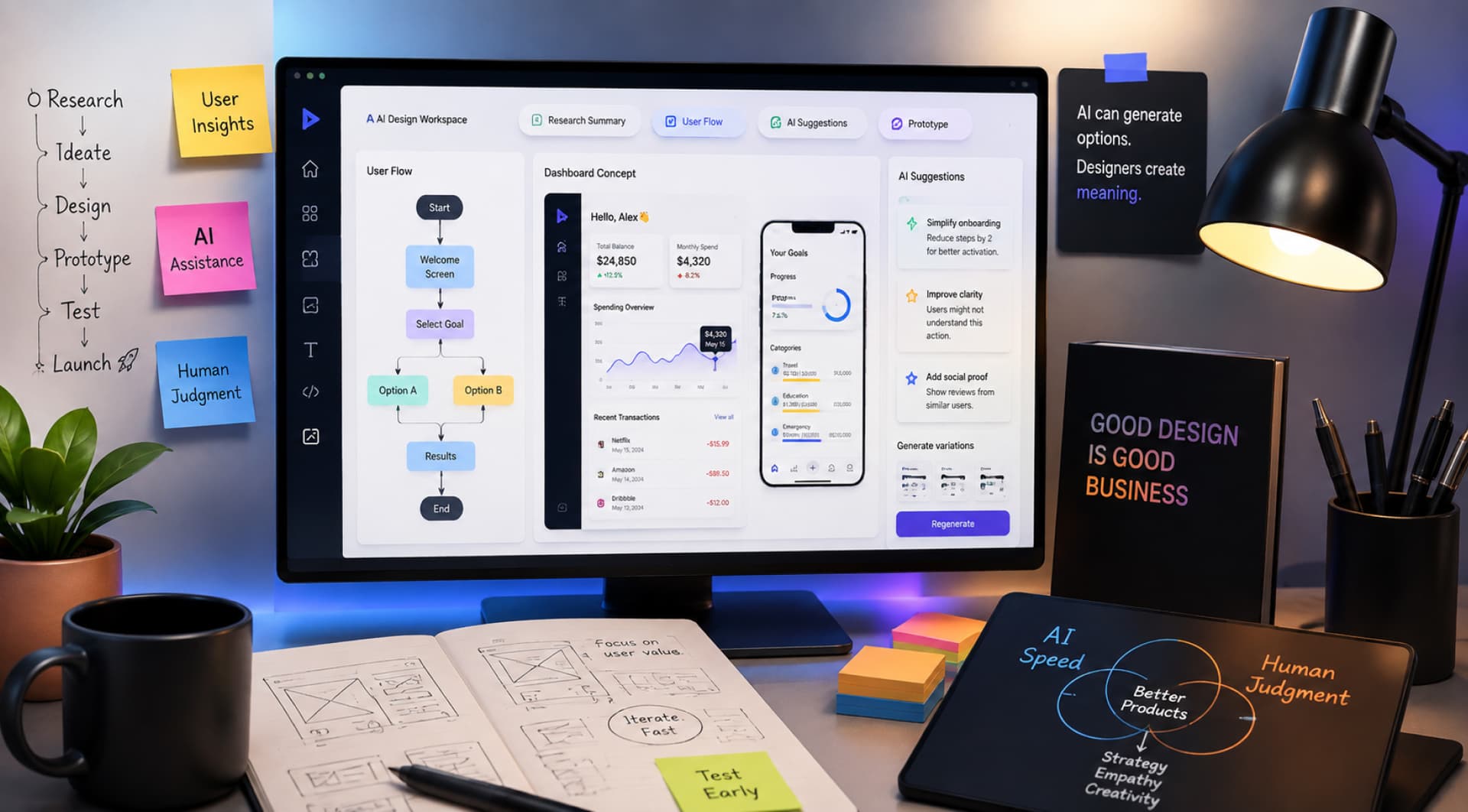
Artificial intelligence is changing how digital products are designed, but the most important change is not simply the arrival of a new generation of design tools.
For product teams, AI is changing where time is spent, how ideas are explored, and how quickly a product can move from an assumption to something people can actually experience.
Research synthesis, ideation, interface exploration, prototyping, content generation, and even parts of implementation can now be accelerated with AI. At the same time, the easier it becomes to produce something that looks like a product, the more important it becomes to understand whether that product is solving the right problem in the first place.
This creates an interesting tension. AI can make design execution dramatically faster, but it does not automatically make product decisions better.
A generated interface can be polished and still be wrong. A generated user flow can feel logical while missing an important business constraint. A prototype can work technically while failing to communicate the value of the product.
So the real opportunity in AI product design is not to remove human judgment from the process. It is to use AI to reduce repetitive work, explore more possibilities, and give product teams more room to focus on the decisions that matter.
That distinction is increasingly important as AI moves from being a tool designers use into something that becomes part of the products they design.
What AI Product Design Actually Means
AI product design can mean two slightly different things.
The first is using AI to improve the product design process. A designer might use an AI system to organize research findings, generate alternative flows, create interface concepts, prepare prototype content, or explore different solutions to the same problem.
The second is designing a product that itself depends on AI. In that case, the AI becomes part of the user’s experience, and the design needs to account for things such as uncertainty, variable outputs, system latency, trust, correction, and human control.
These two ideas are related, but they are not the same.
Using AI to generate interface concepts does not automatically make a product AI-native. Likewise, adding a chatbot to an existing SaaS product does not necessarily mean the product has been redesigned around AI.
An AI-native product starts with a different question: what becomes possible when the system can understand intent, generate content, reason over information, and potentially take action?
That question can change the interaction model itself.
Traditional software tends to be built around explicit actions and relatively predictable outputs. Users select options, fill out forms, navigate menus, and trigger known operations. AI introduces a more open-ended relationship between what users express and what the system produces.
That does not make traditional interfaces obsolete. It makes the choice of interaction model more important.
The best AI products are unlikely to be purely conversational. They will combine natural language with structured controls, visual interfaces, generated content, and direct manipulation according to the needs of the task.
AI Is Changing the Product Design Workflow
The most useful way to think about AI in product design is not as a separate “AI step,” but as something that can change the efficiency of the entire process.
Research, ideation, prototyping, and validation are still necessary. What changes is the cost of exploring each stage.
Research becomes easier to process
Product teams often collect far more information than they can comfortably synthesize: customer interviews, support conversations, surveys, reviews, analytics, competitor research, and internal documentation.
AI can help turn this material into a more manageable starting point by grouping themes, summarizing conversations, comparing responses, and surfacing patterns that deserve closer attention.
That can save substantial manual effort, but there is an important distinction between processing information and understanding people.
A model may identify that several users complained about a feature. It does not automatically tell you whether those complaints have the same underlying cause, whether the issue is important enough to change the roadmap, or what the users actually need instead.
This is why AI works best as an accelerator for research rather than a replacement for research judgment.
Ideation becomes broader
AI is also useful when a team needs to explore several possible directions.
Instead of moving immediately from a problem statement to one proposed solution, designers can use AI to generate alternative workflows, content structures, interaction models, or product concepts.
The value is not that AI will identify the best answer automatically.
It is that exploration becomes cheaper.
A team can compare several approaches before becoming attached to one of them.
This matters particularly during early product work, when changing direction is relatively inexpensive and learning is more valuable than polishing.
The product designer’s role becomes less about producing every possible option manually and more about deciding which options are worth investigating.
Interface generation is becoming faster
Generative tools can also reduce the distance between a concept and an interface.
Designers can describe a product idea, generate an initial structure, adjust the direction, and move toward an interactive prototype much faster than with a fully manual workflow.
This is useful, but it creates another problem: generated interfaces tend to inherit familiar patterns.
A model that has seen thousands of dashboards, SaaS products, forms, and navigation systems will naturally reproduce patterns that already exist.
That can be helpful when conventional interaction is exactly what you need.
It becomes a problem when your product needs to differentiate through its experience.
A generated interface should therefore be treated as a design hypothesis, not as evidence that the design is finished.
From Faster Execution to Better Product Decisions
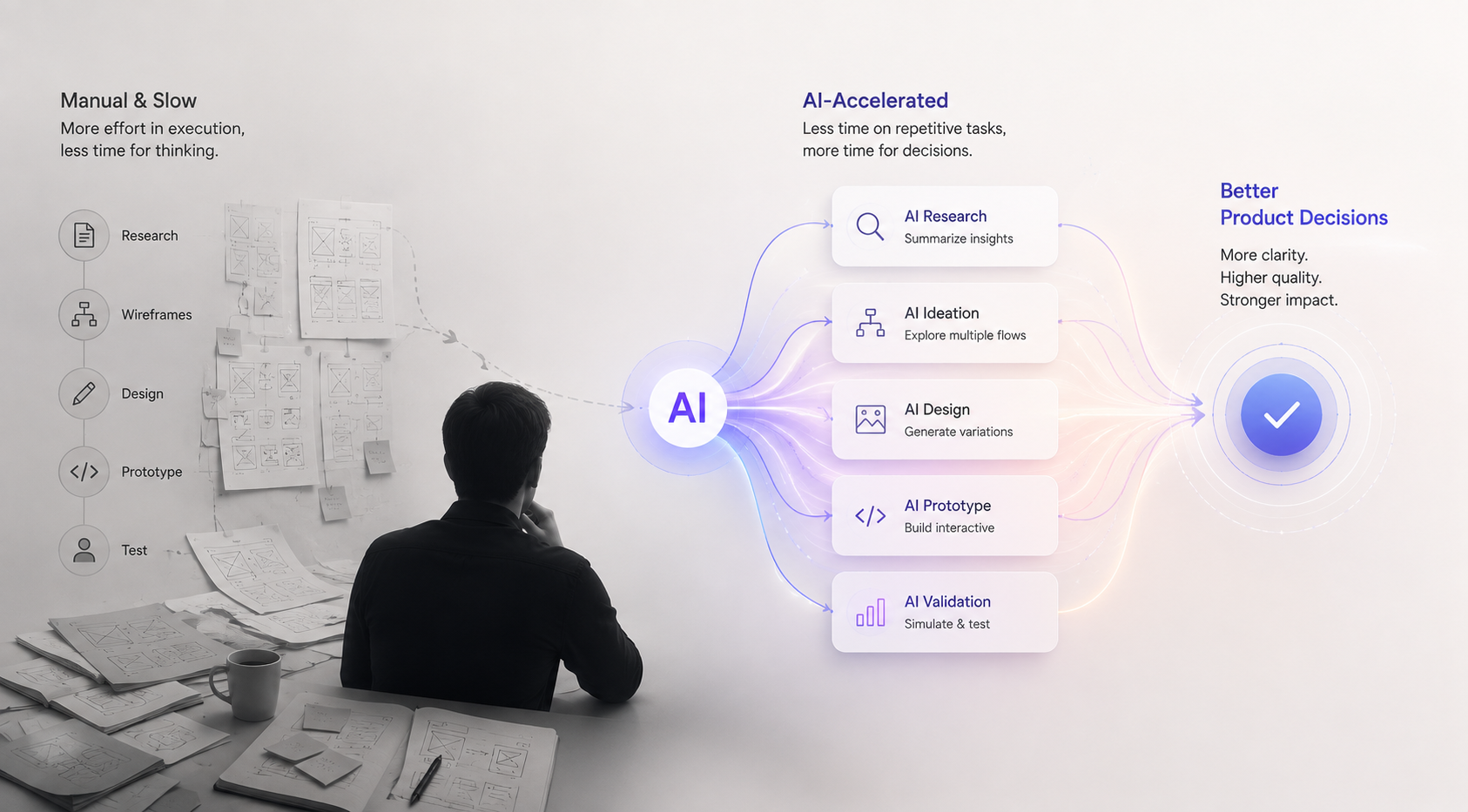
This is where the real value of AI starts to emerge.
The obvious benefit is speed: faster wireframes, faster interface variations, faster content, faster prototypes.
The more important benefit is shorter feedback loops.
Suppose a team is considering two different onboarding approaches. In a traditional process, each direction might require substantial manual design work before anyone can evaluate it.
With AI-assisted workflows, both can be explored quickly enough to compare them with users or stakeholders before a major investment is made.
The advantage is not simply that the team has saved design hours.
The team has created an opportunity to make a better decision earlier.
That distinction is central to good product development.
AI becomes most valuable when it reduces the cost of asking questions.
- What if we structure the workflow differently?
- What if the user starts with an intent instead of a form?
- What if the dashboard becomes a conversational workspace?
- What if the system generates the first draft and the user only reviews it?
- What if we remove this step entirely?
When experimentation becomes cheaper, product teams can spend more time exploring the problem instead of defending their first solution.
Prototyping Is Becoming a More Strategic Activity
Prototyping has traditionally been used to represent an idea before development.
AI is expanding what that prototype can be.
Modern AI-assisted tools can produce experiences that are not just visually realistic but increasingly functional. Figma’s current AI capabilities, for example, allow teams to move from natural-language descriptions toward interactive, code-backed prototypes and then refine those experiences through further design work.
The important shift is not that prototypes look better.
It is that they can become closer to something people can actually test.
That matters for founders and product teams because many product questions are difficult to answer with static screens.
- Does the workflow make sense?
- Does the user understand the value?
- Do they know what to do next?
- What happens when they make a mistake?
- What happens when the system cannot complete the task?
A realistic prototype gives people something concrete to react to.This is particularly valuable when teams need to validate product ideas before development.
For AI products, this becomes even more important because the system’s behavior is part of the experience. A prototype may need to simulate generation, errors, corrections, alternative outputs, approvals, or tool execution, not simply transitions between screens.
Recent CHI research on generative-AI prototyping found that teams increasingly use prompts and generated content as part of an iterative design process, while also encountering new challenges around model interpretability, prompt sensitivity, and overfitting designs to specific examples.
That suggests an important change in the role of prototyping: teams are no longer only prototyping interfaces. They are increasingly prototyping AI behavior and the relationship between that behavior and the interface.
Designing for the Limits of AI
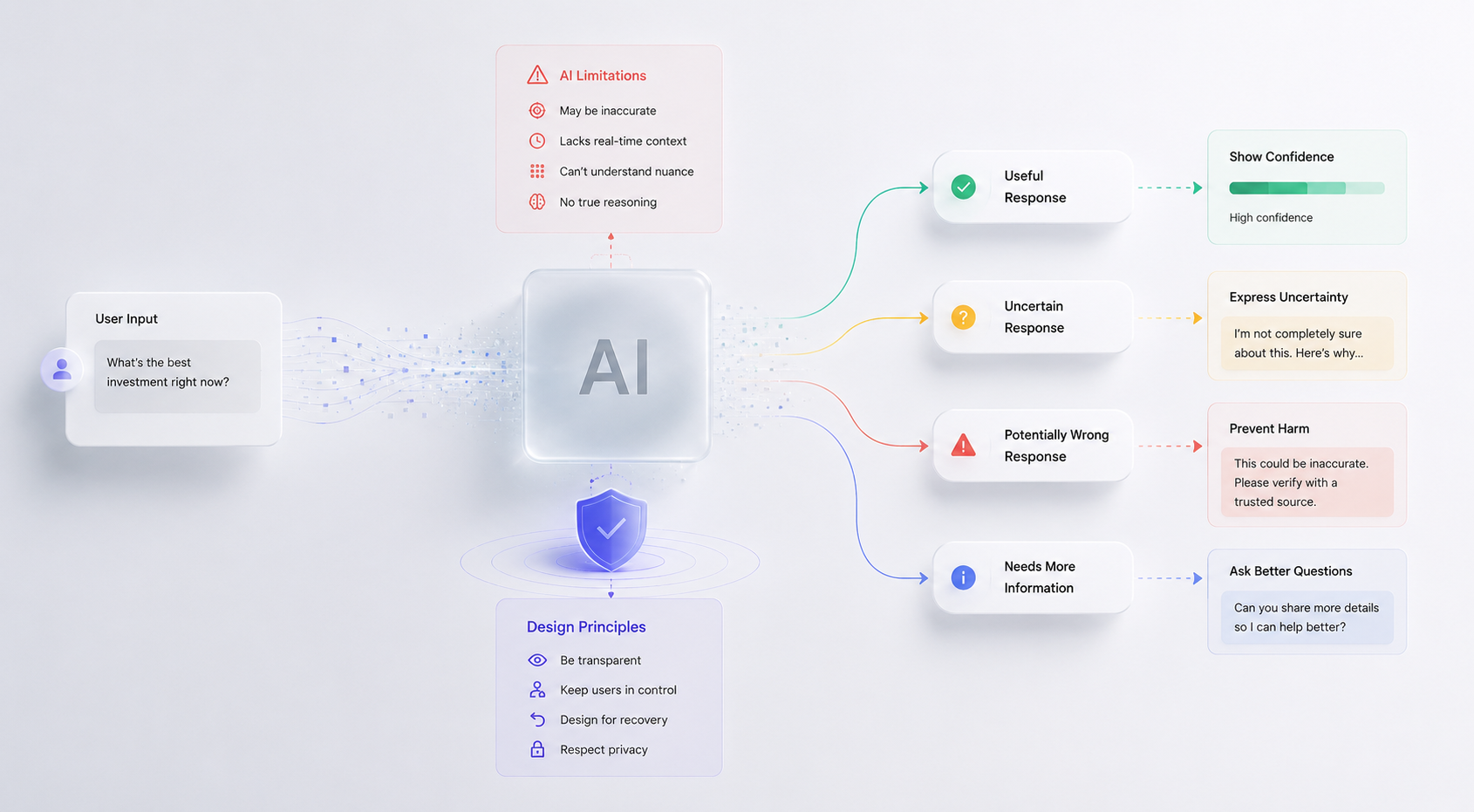
AI makes design faster, but it also introduces failure modes that traditional software teams are not used to dealing with in the same way.
Generative systems can produce plausible but incorrect information. They can interpret the same instruction differently depending on context. Their output quality can vary. Their behavior can change as models, prompts, or surrounding systems evolve.
This changes what it means to design a “complete” experience.
A conventional application might focus primarily on the successful path.
An AI product needs to consider what happens when the system is wrong.
- Can the user edit the result?
- Can they try again?
- Can they understand why the system produced it?
- Can they ignore the suggestion?
- Can they return to a previous state?
- Can they tell how confident they should be?
These are not minor edge cases.
They are part of the core interaction model.
Designing for uncertainty also raises broader questions about responsibility, transparency, and user control, principles that are increasingly important in ethical UX design.
Trust Becomes a Design Problem
When users interact with AI, they are constantly calibrating how much trust to place in the system.
Too little trust makes the product feel useless.
Too much trust can be dangerous.
This does not mean exposing technical model details to everyone.
A user rarely needs to know the architecture of an LLM.
They may, however, need to see where an answer came from, which data informed a recommendation, whether information has been verified, or what action the system is about to take.
The right amount of transparency depends on context.
A writing assistant may only need to show that text was generated by AI.
A research product may need citations and sources.
A financial product may need an explanation of which transactions contributed to a recommendation.
An enterprise agent may need to provide a record of the actions it took.
The goal is not maximum transparency.
It is useful transparency.
AI Should Not Take Control Away From the User
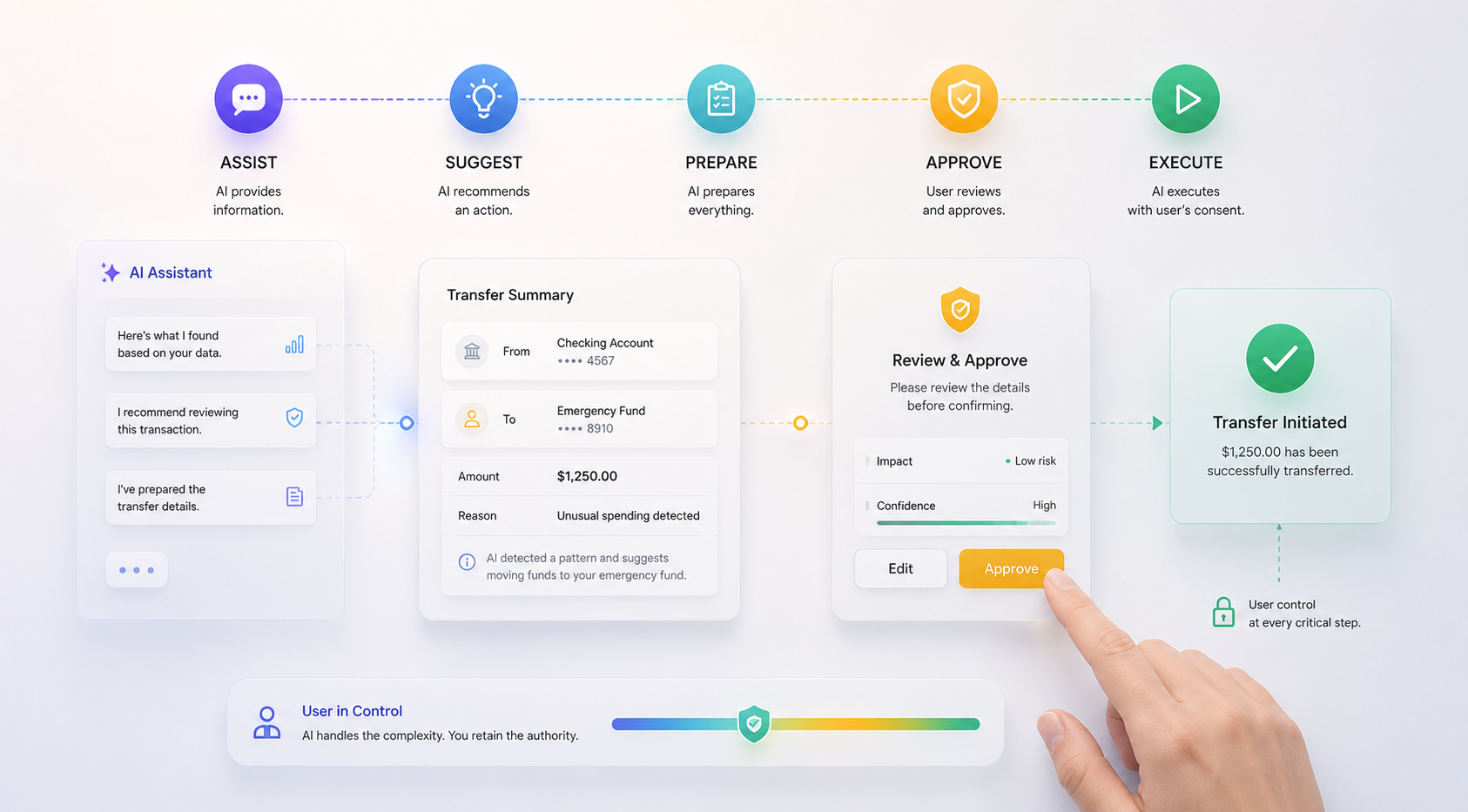
As AI becomes more capable, automation becomes increasingly attractive.
But automation needs boundaries.
A system that can draft an email can probably do so automatically.
A system that can transfer money, delete records, publish a document, or change important settings should usually provide much stronger opportunities for review and approval.
A useful way to think about this is as a progression:
Assist → Suggest → Prepare → Approve → Execute
The right point on that spectrum depends on the consequences of failure.
This becomes especially important in areas such as financial services, healthcare, security, and enterprise operations.
Consider an AI financial assistant. It might analyze a user’s transactions, identify an unusual pattern, suggest a course of action, and prepare the required steps.
The final transfer, however, can remain under explicit user control.
The AI handles the complexity.
The user retains the authority.
This distinction becomes even more important as AI agents move beyond answering questions and begin interacting with external systems. Anthropic’s recent work on trustworthy agents highlights the additional risks created by autonomy, including unintended actions caused by misunderstandings of user intent and attacks such as prompt injection.
AI Products Need to Be Designed for Failure
Latency, tool errors, incomplete responses, safety restrictions, and unexpected outputs are all part of the reality of AI-powered products.
A generic loading spinner is rarely enough for a long-running AI task.
If the system is researching information, generating a report, calling several tools, or performing a multi-step task, users benefit from knowing that the system is actively working and, where appropriate, what stage it has reached.
The experience should also have a clear response when something fails.
Instead of:
Something went wrong.
the product should help answer:
- What failed?
- Did anything happen?
- Should I try again?
- Do I need to change the request?
- Is the task still running?
- Can I safely continue?
This is one reason AI products require more than a happy-path prototype.
The system’s imperfect behavior is part of the product.
The Risk of Generic AI Design
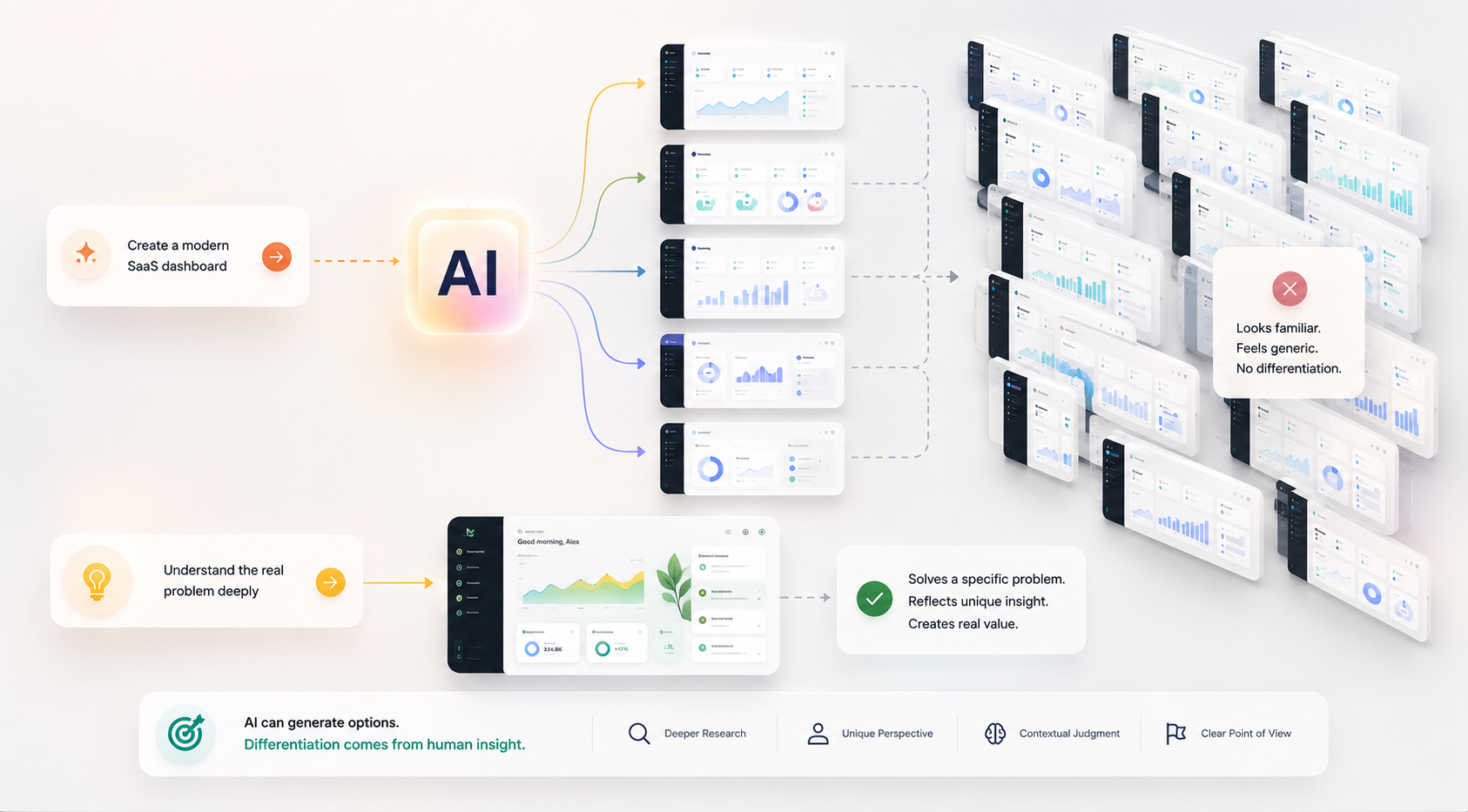
There is another problem that is less about AI reliability and more about product differentiation.
AI is extremely good at producing familiar patterns.
Give it a description of a modern SaaS dashboard, and it will likely produce something that looks like a modern SaaS dashboard.
Give it a description of an AI assistant, and you may get a prompt field, message bubbles, cards, and suggested actions.
There is nothing inherently wrong with these patterns.
The problem begins when they become the solution to every problem.
If every product relies on similar prompts, components, layouts, and interaction patterns, the cost of producing UI may fall while the difficulty of creating a distinctive experience increases.
This is why brand, product strategy, interaction design, and domain knowledge become more importantو not less.
AI can generate possibilities.
It should not determine what makes a product unique.
The Product Designer’s Role Is Changing
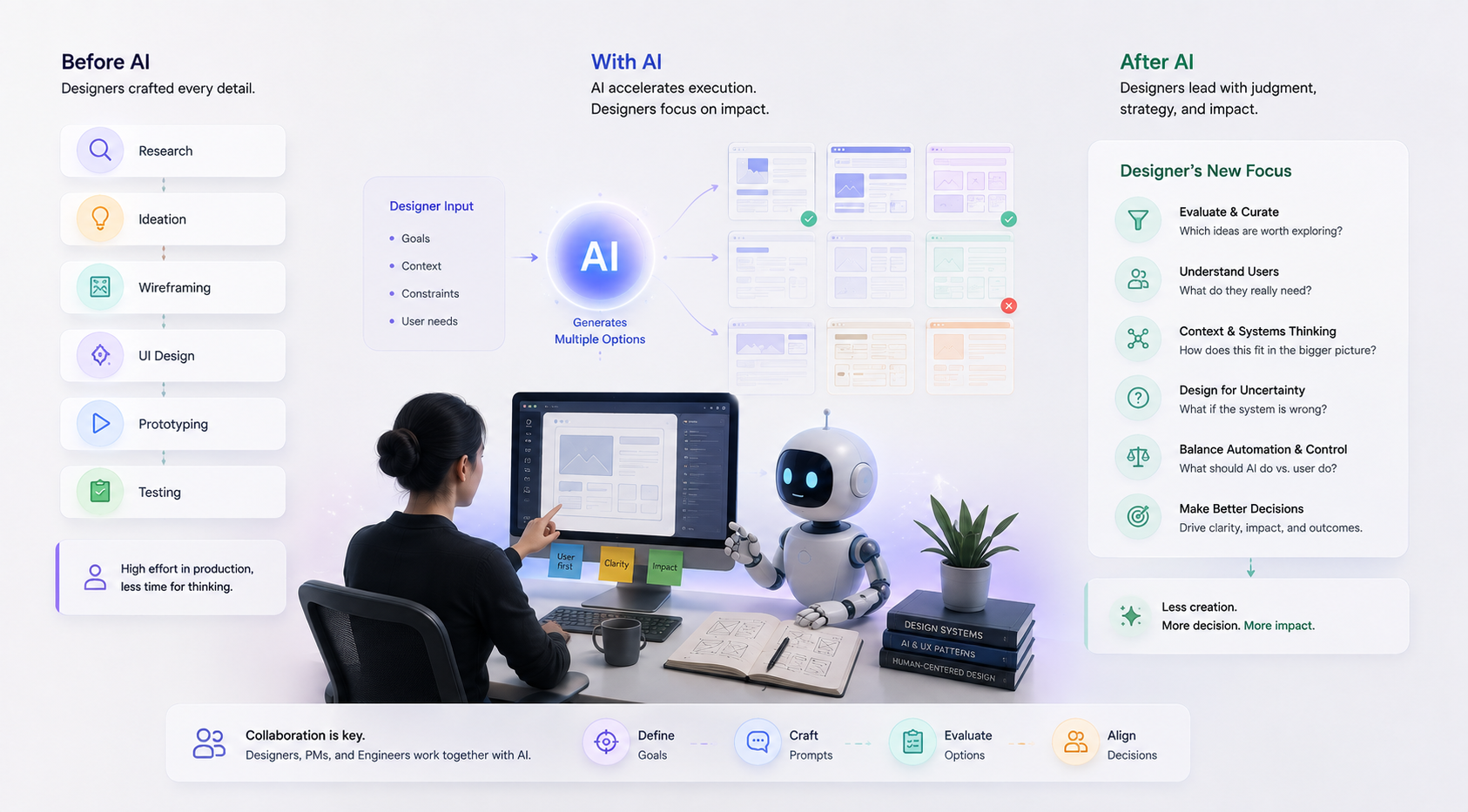
AI does not eliminate the need for product designers. It changes where their value is concentrated.
When a machine can produce ten interface concepts in a few minutes, generating an interface is no longer the scarce skill.
The scarce skills become judgment, context, systems thinking, and decision-making.
A strong product designer still needs to understand users, information architecture, interaction patterns, visual hierarchy, accessibility, and design systems.
But they also need to understand how AI behaves, how to evaluate generated outputs, how to recognize generic solutions, and how to design for uncertainty.
This creates a shift from creation toward curation.
The designer increasingly decides:
- Which idea should we explore?
- Which output should we reject?
- What does the user actually need?
- What is the model missing?
- What happens when the system is wrong?
- Which parts should be automated?
- Where should the user remain in control?
This is not a smaller role.
It is a more strategic one.
Recent CHI research on generative-AI prototyping similarly observed changing responsibilities among designers, product managers, and engineers, with teams collaboratively shaping prompts, examples, design goals, and evaluation criteria.
AI Product Design Needs Stronger Systems Thinking
The more complex the product, the less useful it becomes to think only in terms of screens.
A financial application is not a collection of account, card, payment, and transaction screens.
It is a system of states, permissions, business rules, data, integrations, events, and user decisions.
The same is becoming true of AI products.
An AI assistant is not simply:
Prompt → Answer
It may actually be:
Intent → Context → Model → Tools → Intermediate states → Output → Review → Action
Every transition can create a UX question.
- What context does the AI have?
- What happens if the context is incomplete?
- Which tools can it access?
- What happens when one tool fails?
- How does the user know which action was taken?
- Can the user undo it?
- When does the system ask for approval?
These questions sit at the intersection of product design, engineering, and system architecture.
That is why AI product design benefits from close collaboration between designers, product managers, engineers, and AI specialists.
Choosing AI Design Tools by the Job, Not the Hype
The AI design ecosystem is changing too quickly for any permanent list of “best tools” to remain useful.
A better approach is to choose tools according to the job they need to perform.
Large language models can help with research synthesis, brainstorming, content exploration, and reasoning.
Design platforms can help with interface exploration, component work, and visual prototyping.
Code-aware tools can help move concepts closer to working software.
Agentic systems can support more complex workflows involving tools, memory, and multiple steps.
The important question is not:
Which AI tool should our team use?
It is:
Which part of our workflow is currently expensive, repetitive, or difficult to explore?
That question makes tool selection much more grounded.
The best teams may end up using fewer tools, not more, because they understand exactly where each one adds value.
How to Use AI Without Losing the Design Process
A practical rule for AI-assisted product design is simple:
Use AI to accelerate exploration, not to outsource judgment.
- Let AI help with breadth.
- Let humans provide depth.
- Let AI produce alternatives.
- Let humans choose the direction.
- Let AI process information.
- Let humans interpret its meaning.
- Let AI generate a first draft.
- Let humans decide whether that draft is actually good enough.
This balance matters because AI can create a dangerous illusion of progress.
A product team can produce more artifacts than ever while learning very little about whether the product actually works for its users.
The answer is not to avoid AI.
It is to keep validation inside the workflow.
Research. Explore. Prototype. Test. Learn. Change.
Then repeat.
The Future of AI Product Design
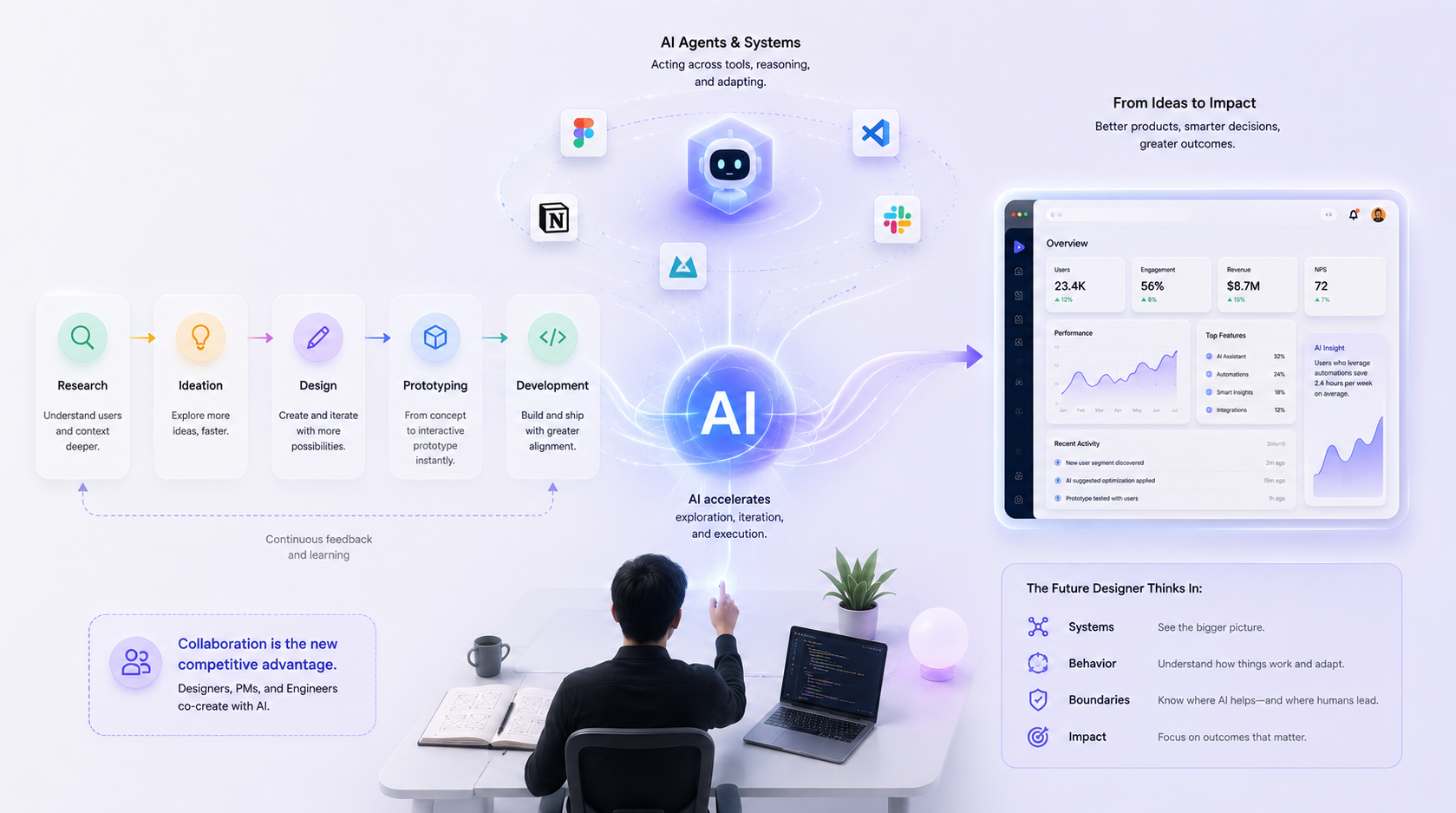
The next generation of product design is unlikely to be defined by one particular AI tool.
The bigger shift is that the boundaries between research, design, prototyping, and development are becoming less rigid.
Ideas can become prototypes faster.
Prototypes can become working interfaces faster.
Designers can participate earlier in technical exploration.
Developers can influence product behavior earlier in the process.
And AI systems themselves are becoming more capable of acting across tools and applications. Anthropic’s current guidance on agentic systems, for example, distinguishes between simpler prompt-response systems and more autonomous agents that reason, use tools, and adapt their approach.
This means the future product designer will increasingly need to think about systems, behavior, and boundaries, not just screens.
The important question will not be whether AI can generate a design.
It will be whether the team can use AI to arrive at a better product decision.
That is a much higher bar.
Designing With AI, Not Just Faster
AI is making product execution faster, but speed is not the real transformation.
The real transformation is the ability to explore more, test earlier, and learn before expensive decisions become difficult to reverse.
A good AI product design workflow uses AI where it is strongest: processing information, generating possibilities, accelerating production, and reducing repetitive work.
It keeps humans responsible for the things that require context and judgment: understanding users, framing problems, making trade-offs, validating assumptions, and deciding what should exist.
And when AI becomes part of the product itself, the design challenge expands further.
The experience must account for uncertainty, trust, errors, latency, correction, transparency, and human control. Research from Microsoft, Google, and the broader HCI community reinforces these as fundamental considerations for human-centered AI design.
The result is not a future without designers.
It is a future where good design judgment becomes more valuable because production itself is becoming easier.
At youX Studio, we approach AI product design from that perspective. We use AI to accelerate research, exploration, prototyping, and iteration while keeping product strategy, user understanding, and design judgment at the center.
Because the goal is not to generate more interfaces.
The goal is to make better products, and make better decisions before those decisions become expensive.
Building an AI-Powered Product?
Whether you’re exploring a new AI product, adding intelligent capabilities to an existing SaaS platform, or designing a more complex automation workflow, the right product design process can help you understand the experience before committing to full-scale development.
youX Studio helps teams turn complex AI capabilities into clear, usable, and scalable product experiences, from early discovery and prototyping to mature product design.